📌 Object Class
Object 클래스란?
자바에서 클래스를 만들 때 extends를 명시하지 않으면 자동으로 Object를 상속 받게 된다.
Object 클래스는 java.lang 패키지에 속해 있으며, 이 패키지는 자동 import 대상이기 때문에 별도로 import를 명시하지 않아도 된다.
때문에 java.lang.Object 는 모든 자바 클래스의 조상(최상위 클래스) 이라고 할 수 있다.
class Person {
	...
}
class Person extends Object {
...
}위 두 코드는 동일하다.
그렇기에 우리가 Java에서 클래스를 만들 때, 따로 Object 클래스를 extends 하지 않더라도 toString(), equals() 같은 메서드를 이용할 수 있는 것이다.
왜 존재할까?
1. 일관성
모든 객체가 공통적으로 사용할 수 있는 기능(toString, equals 메서드 등)을 제공한다.
2. 다형성 기반
Object 타입 하나로 모든 객체를 담을 수 있다.
Object obj = "hello";  // 문자열
obj = new ArrayList<>(); // 리스트
주요 메서드들
| 메서드 | 설명 |
|---|---|
toString() | 객체 정보를 문자열로 반환한다. (기본 구현은 클래스이름@해시코드) |
equals(Object obj) | 두 객체의 논리적 동등성을 비교한다. (기본은 참조 비교, 필요시 오버라이딩) |
hashCode() | 객체의 해시 값을 반환한다. HashMap, HashSet 등에서 사용된다. |
getClass() | 런타임 시 실제 클래스 정보를 반환한다. 리플렉션 등에 사용된다. |
clone() | 객체를 복제한다. 단, Cloneable 인터페이스 구현이 필요하다. |
finalize() | 객체가 GC 대상이 되기 전 마지막 정리 작업을 정의할 수 있다. (현재는 Deprecated) |
이번 글에서는 이 중
toString(), equals(), hashCode() 메서드에 대해 자세히 다루어보려고 한다.
📌 toString()
Object Class 내에 정의된 toString()
    /**
     * Returns a string representation of the object.
     * @apiNote
     * In general, the
     * {@code toString} method returns a string that
     * "textually represents" this object. The result should
     * be a concise but informative representation that is easy for a
     * person to read.
     * It is recommended that all subclasses override this method.
     * The string output is not necessarily stable over time or across
     * JVM invocations.
     * @implSpec
     * The {@code toString} method for class {@code Object}
     * returns a string consisting of the name of the class of which the
     * object is an instance, the at-sign character `{@code @}', and
     * the unsigned hexadecimal representation of the hash code of the
     * object. In other words, this method returns a string equal to the
     * value of:
     * <blockquote>
     * <pre>
     * getClass().getName() + '@' + Integer.toHexString(hashCode())
     * </pre></blockquote>
     *
     * @return  a string representation of the object.
     */
    public String toString() {
        return getClass().getName() + "@" + Integer.toHexString(hashCode());
    }
toString() 메서드는 객체를 문자열로 표현한 값을 반환한다.
이는 객체의 정보를 사람이 읽을 수 있는 형태로 변환한 문자열이라고 할 수 있다.
@return a string representation of the object.
return getClass().getName() + "@" + Integer.toHexString(hashCode());클래스 이름 + @ + 16진수 해시코드 형태 로 반환한다.
예제
Person 클래스
static class Person {
    String name;
    int age;

    Person(String name, int age) {
        this.name = name;
        this.age = age;
    }
}
public static void main(String[] args) {
Person person = new Person("Sangho", 26);
System.out.println(person.toString());
}결과
{패키지명}.test$Person@251a69d7
메서드에 정의된 내용대로 잘 출력되는 것을 볼 수 있다.
하지만 보통 출력을 할 때, toString() 을 명시해서 사용하는 경우는 드물다.
public static void main(String[] args) {
    Person person = new Person("Sangho", 26);
    System.out.println(person);
}
결과
{패키지명}.test$Person@251a69d7
위처럼 toString() 메서드를 붙이지 않더라도 동일한 결과를 얻을 수 있다.
그 이유가 무엇일까?
System.out.println()
System.out.println() 메서드를 호출하면, 안전하게 출력을 하기 위해서 모든 타입을 먼저 String.valueOf()로 감싸게 된다.
System.out.println(person); // 내부적으로 ↓ 이렇게 동작함
PrintStream.println(String.valueOf(person));
String.valueOf()
public static String valueOf(Object obj) {
    return (obj == null) ? "null" : obj.toString();
}
그리고 String.valueOf() 메서드는 위와 같이 동작하게 된다.
즉,
null인지 먼저 체크하고, null이 아니면toString()을 호출해서 그 결과를 출력해준다.
이 때문에 System.out.println() 로 출력을 할 때에는 자동적으로 toString() 메서드까지 호출이 되는 것이다.
왜 이렇게 설계했을까?
그럼 String.valueOf()를 호출하지 않고, 바로 toString()을 호출해도 되지 않느냐 하는 궁금증이 생길 수 있다.
만약 null 값에 대해서, null.toString() 을 바로 호출하면 NPE(NullPointerException) 가 발생하게 된다.
그렇기에 먼저 valueOf()로 감싸서 안전하게 null도 처리할 수 있게 만든 것이다.
String, int 타입 출력
public static void main(String[] args) {
    Person person = new Person("Sangho", 26);

    System.out.println(person.name);
    System.out.println(person.age);
}
그렇다면 만약 위처럼 객체 자체가 아닌, 객체 안에서 각각 타입이 존재하는 필드 값을 출력할 때는 어떻게 동작할까?
결과
Sangho
26
모두가 알다시피 그대로 값이 출력되어서 나온다.
그 이유는 String.valueOf() 메서드가 오버로딩되어 있기 때문이다.
String.valueOf() 메서드 오버로딩
| 타입 | 메서드 시그니처 | 설명 |
|---|---|---|
boolean | public static String valueOf(boolean b) | "true" 또는 "false"로 반환 |
char | public static String valueOf(char c) | 문자 하나를 문자열로 변환 |
int | public static String valueOf(int i) | Integer.toString(i) 호출 |
long | public static String valueOf(long l) | Long.toString(l) 호출 |
float | public static String valueOf(float f) | Float.toString(f) 호출 |
double | public static String valueOf(double d) | Double.toString(d) 호출 |
char[] | public static String valueOf(char[] data) | 문자 배열 전체를 문자열로 변환 (new String(data)) |
char[], int, int | public static String valueOf(char[] data, int offset, int count) | 문자 배열의 일부를 문자열로 변환 |
String | public static String valueOf(String s) | null이면 "null", 아니면 그대로 반환 |
Object | public static String valueOf(Object obj) | null이면 "null", 아니면 obj.toString() 호출 |
이는 String 클래스 내부에서 살펴볼 수 있다.
int, long, float, double 같은 원시 타입은 System.out.println() 등에서 문자열로 출력될 때, 내부적으로 해당 래퍼 클래스(Integer, Long, Float, Double)의 toString() 메서드를 사용하여 문자열로 변환된다.
여기서 Integer, String 만 살펴보도록 하겠다.
Integer 클래스 내의 toString()
/**
 * Returns a {@code String} object representing this {@code Integer}'s value.
 * The value is converted to signed decimal representation and returned as a string,
 * exactly as if the integer value were given as an argument to the {@link java.lang.Integer#toString(int)} method.
 *
 * @return a string representation of the value of this object in base 10.
 */
public String toString() {
    return toString(value);
}
Integer 클래스 또한 Object를 상속받고 있으며, toString() 메서드를 오버라이드하여 내부 정수 값을 사람이 읽을 수 있는 문자열로 반환한다.
위 메서드가 오버라이드 된(@Override 생략) toString()이며, 이는 내부적인 static 메서드 toString() 을 한 번 더 호출하게 된다.
내부적인 static 메서드 (radix 존재 X)
/**
 * Returns a {@code String} object representing the specified integer.
 * The argument is converted to signed decimal representation and returned as a string,
 * exactly as if the argument and radix 10 were given as arguments to the {@link #toString(int, int)} method.
 *
 * @param i an integer to be converted.
 * @return a string representation of the argument in base 10.
 */
@IntrinsicCandidate
public static String toString(int i) {
    int size = stringSize(i);
    if (COMPACT_STRINGS) {
        byte[] buf = new byte[size];
        getChars(i, size, buf);
        return new String(buf, LATIN1);
    } else {
        byte[] buf = new byte[size * 2];
        StringUTF16.getChars(i, size, buf);
        return new String(buf, UTF16);
    }
}
이는 정수 값을 10진수 문자열로 빠르게 변환해 주는 메서드이다.
Integer 클래스가 Object.toString()을 오버라이딩할 때 이 메서드를 내부적으로 호출한다.
COMPACT_STRINGS 최적화 분기까지 포함된 고성능 버전이라고 볼 수 있다.
@IntrinsicCandidate
해당 어노테이션은 JVM HotSpot이 이 메서드를 네이티브 코드로 인라인 최적화할 수 있다는 것을 의미한다.
즉, int → String 변환이 자주 쓰이기 때문에, JIT 컴파일러가 아주 빠르게 처리할 수 있도록 특별 대우를 해 주는 것이다.
내부적인 static 메서드 (radix 존재 O)
/**
 * Returns a string representation of the first argument in the radix specified by the second argument.
 * If the radix is smaller than {@code Character.MIN_RADIX} or larger than {@code Character.MAX_RADIX}, then radix 10 is used.
 *
 * @param i an integer to be converted to a string.
 * @param radix the radix to use in the string representation.
 * @return a string representation of the argument in the specified radix.
 */
public static String toString(int i, int radix) {
    if (radix < Character.MIN_RADIX || radix > Character.MAX_RADIX)
        radix = 10;
    if (radix == 10) {
        return toString(i);
    }
    if (COMPACT_STRINGS) {
        byte[] buf = new byte[33];
        boolean negative = (i < 0);
        int charPos = 32;
        if (!negative) {
            i = -i;
        }
        while (i <= -radix) {
            buf[charPos--] = (byte)digits[-(i % radix)];
            i = i / radix;
        }
        buf[charPos] = (byte)digits[-i];
        if (negative) {
            buf[--charPos] = '-';
        }
        return StringLatin1.newString(buf, charPos, (33 - charPos));
    }
    return toStringUTF16(i, radix);
}
2진수, 8진수, 16진수 등 원하는 진수로 변환할 때 쓰는 오버로딩 메서드이다.
만약 radix == 10이라면 위의 toString(int)을 호출해서 처리한다.
아니면 digits[] 배열로 직접 문자 변환하고 StringLatin1 또는 toStringUTF16를 사용한다.
String 클래스 내의 toString()
/**
 * This object (which is already a string!) is itself returned.
 *
 * @return the string itself.
 */
public String toString() {
    return this;
}
String 클래스는 그 자체가 문자열이기 때문에, 변환 과정 없이 그대로 자신을 반환하게 된다. return this
이 또한 Object.toString() 메서드를 오버라이드 한 것이다.
📌 equals()
equals()란?
어떠한 두 객체의 값이 같은지, 즉 동등한지 여부를 알려주는 메서드이다.
동일하다 vs 동등하다
둘은 매우 유사하지만 약간은 다른 점이 존재한다.
우선 동일하다는 것은 두 객체가 완전히 같음을 의미한다. Java로 따지자면, 객체의 참조 주소가 동일한 객체라고 할 수 있겠다.
반면 동등하다는 것은 논리적으로 같은 값을 가진다는 의미이다. 즉 객체 자체가 아니라, 객체의 값이 같은지를 판단하게 된다.
때문에 동일한지 여부는 더블 이퀄 == 을, 동등한지 여부는 equals()로 판단하게 된다.
equals()를 오버라이드 해야 하는 이유
그렇다면 equals() 메서드는 왜 오버라이드 해서 사용하라는 것일까? 이는 Object 클래스에 있는 기본적인 동작을 보면 이해할 수 있다.
public boolean equals(Object obj) {
	return (this == obj);
}
equals() 내부에서도 == 로 비교를 한 후에 반환하는 것을 볼 수 있다. 때문에 오버라이드를 하지 않는다면, 그냥 == 를 사용하는 것과 전혀 다름이 없다.
왜 이렇게 만들었을까?
여기서 한 가지 의문이 든다.
내부적으로 == 연산을 진행한 뒤 반환할 거라면, 메서드를 만들지 않고 바로 연산하면 안 되는 것이었을까?
여기에는 아래의 몇 가지 이유들이 존재한다.
공통 인터페이스 제공
자바에서 모든 클래스는 Object를 상속 받게 되기에, Object는 모든 객체에서 공통적으로 필요한 기능을 정의해야 했다.
객체 간의 동등성 비교는 거의 모든 프로그램에서 필요할 수 있기 때문에, 이를 위한 equals() 메서드를 기본으로 제공한 것이다.
왜 기본 구현은
==인가?
Object는 모든 클래스의 최상위 클래스이기 때문에, 그 객체가 무엇을 의미하는지, 내부 값이 무엇을 나타내는지 알 수 없다.
그렇기 때문에 Object 입장에서는 메모리 상 같은 객체인지(동일성)만 비교하는 것이 가장 보편적이고 안전한 기본값이 된다.
즉, 내부 값 기반 비교를 기본으로 제공하기에는 Object 수준에서는 너무 일반적이어서 적용이 불가능했던 것이다.
오버라이드를 염두에 둔 설계
equals()는 처음부터 필요할 때 각 클래스에서 오버라이드하도록 설계된 메서드이다.
즉, 개발자가 클래스의 의미에 맞게 논리적 동등성을 정의하도록 의도된 것이다.
이 점들은 자바의 공식 API 문서 및 도서에서 살펴볼 수 있다.
레퍼런스
1. Java SE 공식 API 문서 (Object 클래스)
The equals method implements an equivalence relation on non-null object references.
It is recommended that all subclasses override this method.- equals()는 모든 객체에서 동등성을 표현할 수 있도록 제공된 메서드다.
- 모든 서브 클래스는 필요하면 이 메서드를 재정의하라(recommended).
2. Effective Java (Joshua Bloch)
Always override equals when logical equality is important.- 논리적 동등성이 중요한 클래스에서는 equals를 반드시 오버라이드하라.
String Class에서의 equals()
위에서 살펴 본 바에 따르면, equals() 메서드는 == 과 동일한 기능을 하게 된다.
하지만 떠올려 보면 우리들은 두 String 타입 문자열을 비교할 때 자연스럽게 equals()를 사용한다.
오버라이드 한 기억은 없는데, 어떻게 된 일일까?
public boolean equals(Object anObject) {
    if (this == anObject) {
        return true;
    }
    return (anObject instanceof String aString)
            && (!COMPACT_STRINGS || this.coder == aString.coder)
            && StringLatin1.equals(value, aString.value);
}
그 이유는, String 클래스에서 이미 equals()를 오버라이드 해두었기 때문이다. 이는 Integer와 같은 대부분의 래퍼 클래스에서 적용되는 내용인데, 여기서는 String만 알아보려고 한다.
동작은 아래와 같다.
this == anObject
- 먼저 동일성(참조값)을 비교한다.
- 참조 값이 같다면 완전히 동일한 객체이므로
true를 바로 반환한다.
instanceof String
anObject가String 인스턴스인지 확인한다.- String 클래스 내부 메서드이므로, 만약 아니라면
false를 반환한다.
coder 비교 (Compact String 최적화)
COMPACT_STRINGS가 활성화된 경우 문자 인코딩coder이 같은지 확인한다.- 내부에서
Latin1인지UTF-16인지 구분하기 위한 최적화 단계이다.
StringLatin1.equals()호출
- 마지막으로 내부 value 배열(문자 데이터)을 비교하여 내용이 같은지를 판단한다.
StringLatin1.equals()
@IntrinsicCandidate
public static boolean equals(byte[] value, byte[] other) {
    if (value.length == other.length) {
        for (int i = 0; i < value.length; i++) {
            if (value[i] != other[i]) {
                return false;
            }
        }
        return true;
    }
    return false;
}
최종적으로 호출되는 메서드는 아래와 같이 동작한다.
- 배열 길이를 먼저 비교하며, 길이가 다르면 바로 false를 반환한다.
- 길이가 같으면 각 byte를 순차적으로 비교한다.
- 하나라도 다르면 false, 모두 같으면 true를 반환한다.
결과적으로 String 클래스는 이미 equals()를 적절히 오버라이드하고 최적화 기능까지 제공하므로, 우리는 편리하게 호출만 하여 문자열 내용을 비교할 수 있는 것이다.
🧑🏻💻 위에서 언급된
coder, COMPACT_STRINGS, Latin1, UTF-16까지 이 글에서 다루기엔 너무 방대해질 것 같아 따로 빼려고 한다.
📌 hashCode()
hashCode() 메서드는 객체를 해시 기반 자료구조(HashMap, HashSet 등)에 저장하거나 검색할 때 사용되는 해시 값을 반환하는 메서드이다.
해시 값이란?
해시 값 이란 일정한 규칙에 따라 계산해 얻은 고정 크기의 숫자(보통 정수 int형)를 의미한다.
이 값은 데이터의 내용을 짧고 고유한 숫자로 요약한 것이라고 볼 수 있다. 동일한 데이터는 동일한 해시 값을 가지며, 다른 데이터는 되도록이면 다른 해시 값을 가지도록 설계된다.
여기서 '되도록'이라고 표현한 이유는, 불가피하게 해시 값이 같은 경우가 발생할 수 있기 때문이다.
왜 필요한가?
이러한 해시 값은 왜 만들고, 왜 쓰는 것일까? 이유는 아래와 같다.
- 해시 기반 자료구조(예: HashMap, HashSet)는 해시 값을 활용해서 데이터의 위치를 빠르게 찾을 수 있다.
- 데이터가 크더라도 짧은 해시 값만 비교하면 되므로 성능이 더 좋다.
즉, hashCode() 에서 반환하는 값은 객체의 내용을 기반으로 계산된 정수이며, 해시 테이블에서 빠르게 데이터를 찾기 위한 주소 역할을 하게 된다.
Object 클래스의 hashCode()
그럼 이러한 해시 값은 어떠한 과정을 통해서 만들어지는 걸까? 지금부터는 이에 대해 파악해보고자 한다.
@IntrinsicCandidate
public native int hashCode();
Object 클래스에서 정의되어 있는 hashCode() 메서드는 위와 같다.
native 메서드
생소한 native 라는 부분이 보일 것이다.
native 메서드는 자바 코드로 구현되어 있지 않고, JVM 내부(네이티브 코드) 에 구현되어 있다. JNI(Java Native Interface) 를 통해 JVM 레벨, 시스템 레벨에서 작동하게 되는 것이다.
기본적으로는 객체의 메모리 주소나 그 주소를 기반으로 계산한 수치를 해시 코드로 반환하게 되는데, JVM 구현마다 방식이 다를 수가 있다.
String 클래스의 hashCode()
String 클래스에서 hashCode() 메서드가 어떻게 오버라이드 되어 있는지 알아보도록 하자.
/**
 * Returns a hash code for this string. The hash code for a
 * {@code String} object is computed as
 * <blockquote><pre>
 * s[0]*31^(n-1) + s[1]*31^(n-2) + ... + s[n-1]
 * </pre></blockquote>
 * using {@code int} arithmetic, where {@code s[i]} is the
 * <i>i</i>th character of the string, {@code n} is the length of
 * the string, and {@code ^} indicates exponentiation.
 * (The hash value of the empty string is zero.)
 *
 * @return a hash code value for this object.
 */
public int hashCode() {
    // The hash or hashIsZero fields are subject to a benign data race,
    // making it crucial to ensure that any observable result of the
    // calculation in this method stays correct under any possible read of
    // these fields. Necessary restrictions to allow this to be correct
    // without explicit memory fences or similar concurrency primitives is
    // that we can ever only write to one of these two fields for a given
    // String instance, and that the computation is idempotent and derived
    // from immutable state
    int h = hash;
    if (h == 0 && !hashIsZero) {
        h = isLatin1() ? StringLatin1.hashCode(value)
                       : StringUTF16.hashCode(value);
        if (h == 0) {
            hashIsZero = true;
        } else {
            hash = h;
        }
    }
    return h;
}
동작 과정은 아래와 같다.
int h = hash;hash는 String 인스턴스 내부의 캐싱된 해시 코드 값으로, 최초에는 0으로 초기화되어 있다.
if (h == 0 && !hashIsZero) {hash 값이 0이고, hashIsZero 플래그도 false일 때만 새로 해시 코드를 계산한다.
왜냐하면 빈 문자열의 해시 값은 0이 되는데, 이를 구분하기 위해 hashIsZero 플래그를 따로 둔 것이다.
h = isLatin1() ? StringLatin1.hashCode(value)
: StringUTF16.hashCode(value);isLatin1()으로 내부 인코딩 방식을 확인하게 된다.
Latin1이면StringLatin1.hashCode()호출
public static int hashCode(byte[] value) {
    int h = 0;
    for (byte v : value) {
        h = 31 * h + (v & 0xff);
    }
    return h;
}1바이트씩 읽으며 (v & 0xff)로 부호 없는 값으로 변환 후 31 * h + v 방식으로 해시 값을 계산한다.
UTF-16이면StringUTF16.hashCode()호출
public static int hashCode(byte[] value) {
    int h = 0;
    int length = value.length >> 1; // 2바이트씩 묶어서 char 단위로 처리
    for (int i = 0; i < length; i++) {
        h = 31 * h + getChar(value, i); // UTF-16에서 char 값을 가져옴
    }
    return h;
}
2바이트(char) 단위로 읽으며 getChar()를 통해 char 값을 추출하고 동일하게 31 * h + char 방식으로 해시 값을 계산한다.
if (h == 0) {
    hashIsZero = true;
} else {
    hash = h;
}
계산된 해시 값이 0이면, 빈 문자열이거나 실제로 값이 0인 경우이므로 hashIsZero = true 로 플래그를 설정한다.
그렇지 않다면, hash에 캐싱한다.
return h;최종적으로 계산 or 캐싱된 해시 값을 반환한다.
📌 equals() & hashCode(), 왜 같이 재정의해야 하는가?
equals() 메서드를 재정의한다면, hashCode() 메서드도 함께 재정의해야 한다는 말을 들어보았을 것이다.
지금부터는 그 이유에 대해서 예시와 함께 알아보고자 한다.
equals() 재정의
Person 클래스
import java.util.Objects;

public class Person {

    int age;
    String name;

    public Person(int age, String name) {
        this.age = age;
        this.name = name;
    }

    @Override
    public boolean equals(Object o) {
        if (this == o) return true;
        if (o == null || getClass() != o.getClass()) return false;
        Person person = (Person) o;
        return age == person.age && Objects.equals(name, person.name);
    }
}
equals() 메서드를 재정의한 Person 클래스이다.
age와 name이 모두 같은 경우에만 동등하다고 판단된다.
💡
Objects.equals()메서드가 속해 있는java.util.Objects 클래스는, Java 7부터 추가된 유틸리티 클래스이다.null처리를 안전하고 간결하게 하거나, 객체 관련 공통 작업을 도와주는 정적 메서드들을 제공한다.
테스트
import java.util.ArrayList;
import java.util.HashSet;
import java.util.List;
import java.util.Set;

public class test {

    public static void main(String[] args) {
        Person person1 = new Person(21, "sangho");
        Person person2 = new Person(21, "sangho");

        // == 비교
        System.out.println(person1 == person2);  // false
        // equals 비교
        System.out.println(person1.equals(person2));  // true

        // List에 추가 후 크기 출력
        List<Person> list = new ArrayList<>();
        list.add(person1);
        list.add(person2);
        System.out.println("List size : " + list.size());  // 2

        // HashSet에 추가 후 크기 출력
        Set<Person> set = new HashSet<>();
        set.add(person1);
        set.add(person2);
        System.out.println("HashSet size : " + set.size());  // 2 (hashCode() 오버라이드 안 했으므로 2)
    }
}
age, name이 같은 두 객체를 생성한다.
==로 비교한다.
- 객체의 참조 주소로 비교하게 되므로, 다른 객체이기에
false가 출력된다.
equals()로 비교한다.
Person클래스에서equals()메서드를 재정의하였으므로,true가 출력된다.
- 두 객체를
ArrayList에 넣고 사이즈를 출력한다.
- 특정한 조건 없이 삽입하므로, 사이즈는 2가 출력된다.
- 두 객체를
HashSet에 넣고 사이즈를 출력한다.
HashSet은 동등한 객체나 값에 대해서 중복을 허용하지 않는다.- 때문에 결과는 1이 나올 것으로 예상했으나, 사이즈가 2가 출력되었다.
그 이유가 무엇일까? 이는 둘의
해시 코드가 다르기 때문이다.
hashCode(), equals() 동작 순서
해시 값을 사용하는 컬렉션들(HashMap, HashSet ..) 은 객체가 논리적으로 동등한지를 판별할 때 아래와 같은 과정을 거친다.
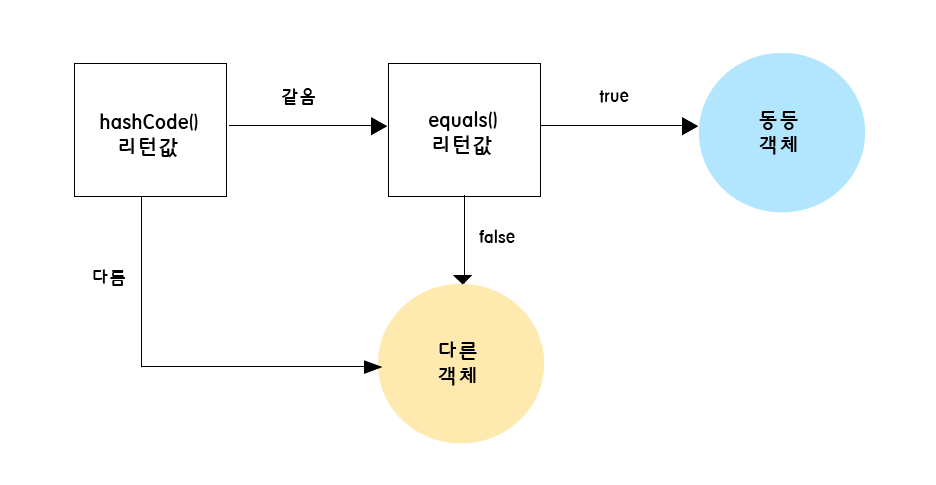
- 우선 두 객체의 해시 코드를 비교한다.
- 여기서 다르다면 바로 다른 객체로 판별한다.
- 다음으로
equals()메서드의 리턴 값으로 최종 판별한다.
즉, equals()는 재정의 하였기에 true로 나오겠지만, 이미 그 이전에 두 객체의 해시 코드가 다르기에 동등하지 않다고 판별된 것이다.
hashCode() 재정의
그럼 이제 hashCode()도 재정의를 한 후 결과가 어떻게 나오는지 살펴보자.
Person 클래스
import java.util.Objects;

public class Person {

    int age;
    String name;

    public Person(int age, String name) {
        this.age = age;
        this.name = name;
    }

    @Override
    public boolean equals(Object o) {
        if (this == o) return true;
        if (o == null || getClass() != o.getClass()) return false;
        Person person = (Person) o;
        return age == person.age && Objects.equals(name, person.name);
    }

    @Override
    public int hashCode() {
        return Objects.hash(age, name);
    }
}
hashCode()를 재정의한 모습이며, Objects.hash() 메서드를 사용하였다.
Objects.hash() 메서드
public static int hash(Object... values) {
	return Arrays.hashCode(values);
}
Objects 클래스의 hash() 메서드는 이렇게 여러 파라미터를 받을 수 있도록 구현되어 있다.
가변 인자를 받아 배열을 만들고 처리하기 때문에, 다소 오버헤드(불필요한 배열 생성 비용) 가 있을 수는 있다고 한다.
그리고 이를 Arrays.hashCode() 메서드로 넘긴다.
Arrays.hashCode() 메서드
public static int hashCode(Object a[]) {
	if (a == null)
    	return 0;

	int result = 1;

	for (Object element : a)
		result = 31 * result + (element == null ? 0 : element.hashCode());

	return result;
}
들어온 파라미터들에 대해서 해시 연산을 수행한 후, 해시 코드를 반환한다.
테스트
package equals;

import java.util.HashSet;
import java.util.Set;

public class test {

    public static void main(String[] args) {
        Person person1 = new Person(21, "sangho");
        Person person2 = new Person(21, "sangho");

        // hashCode 출력
        System.out.println("person1 hashCode : " + person1.hashCode()); // -909652454
        System.out.println("person2 hashCode : " + person2.hashCode()); // -909652454

        // HashSet에 추가 후 크기 출력
        Set<Person> set = new HashSet<>();
        set.add(person1);
        set.add(person2);
        System.out.println("HashSet size : " + set.size());
    }
}
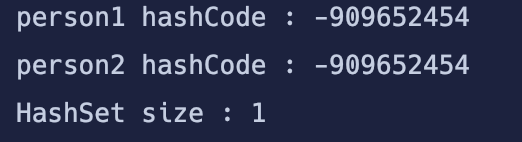
테스트 결과, 두 객체의 해시 코드가 동일하고 그로 인해 HashSet에도 1개의 객체만 정상적으로 들어가 있는 모습을 볼 수 있다.
정리
- HashSet, HashMap과 같은 해시 기반 자료구조는 내부적으로 hashCode()로 먼저 후보를 좁히고 equals()로 최종 비교를 한다.
equals()만 재정의하고hashCode()를 재정의하지 않으면,equals()가 true라도 서로 다른 버킷에 저장된다.
-> 이로 인해 논리적으로 같은 객체가 중복 삽입되는 문제가 발생하게 된다.
Java의 규약은equals()가 true면hashCode()도 같아야 한다고 명시하고 있다.
이 규약을 어기면 해시 기반 자료구조에서 예기치 못한 동작(중복, 검색 실패 등)이 발생할 수 있다.
identityHashCode() 메서드
hashCode()를 재정의하게 되면, 객체의 식별 값이 아닌 -> 클래스의 논리적 동등성 기준에 맞춰 해시 코드를 반환하게 된다.
하지만 때로는 JVM 내부, 디버깅, 메모리 분석 등의 이유로 객체 자체의 식별 값(해시 코드)이 필요할 때가 있다.
이런 경우에서는 Java의 identityHashCode() 메서드를 이용할 수 있다.
identityHashCode()
/**
 * Returns the same hash code for the given object as
 * would be returned by the default method hashCode(),
 * whether or not the given object's class overrides
 * hashCode().
 * The hash code for the null reference is zero.
 *
 * @param x object for which the hashCode is to be calculated
 * @return  the hashCode
 * @since   1.1
 * @see Object#hashCode
 * @see java.util.Objects#hashCode(Object)
 */
@IntrinsicCandidate
public static native int identityHashCode(Object x);
이는 Object 클래스의 hashCode() 메서드와 로직이 동일하다. 또한 Objects 클래스의 hashCode()와도 유사한데, 때문에 주석에 이에 대한 내용이 기재되어 있다.
테스트
public class test {

    public static void main(String[] args) {
        Person person1 = new Person(21, "sangho");
        Person person2 = new Person(21, "sangho");

        // 재정의된 hashCode 출력
        System.out.println("person1 hashCode : " + person1.hashCode()); // -909652454
        System.out.println("person2 hashCode : " + person2.hashCode()); // -909652454

        // identityHashCode 출력 (주소 기반 해시 값)
        System.out.println("person1 identityHashCode : " + System.identityHashCode(person1)); // 1159190947
        System.out.println("person2 identityHashCode : " + System.identityHashCode(person2)); // 925858445
    }
}
테스트 결과, identityHashCode()로 출력한 두 객체의 해시 코드는 다른 것을 볼 수 있다.
이는 오버라이딩과 무관하게, 객체 자체의 해시 코드이기 때문에 모든 객체들에 대해서 항상 다른 해시 코드를 반환할 것을 보장한다.
🧑🏻💻 하지만 과연 모든 객체들은 서로 다른 해시 코드를 가질까? 다음 글은 이에 대해 알아보고자 한다.